
Description
6181X-12TPXPDC Allen-Bradley Product Introduction
- Model: 6181X-12TPXPDC
- Brand: Allen-Bradley (Rockwell Automation)
- Series: Allen-Bradley 6181X PanelView Plus 7 Series
- Core Function: Industrial touchscreen HMI for process control
- Type: Human-Machine Interface (HMI) Panel
- Key Specs: 12-inch touchscreen, 1280×800 resolution, Ethernet
- Supply Status: In Stock
- Stock: 2
- Warranty: 1 year
- Ship From: China
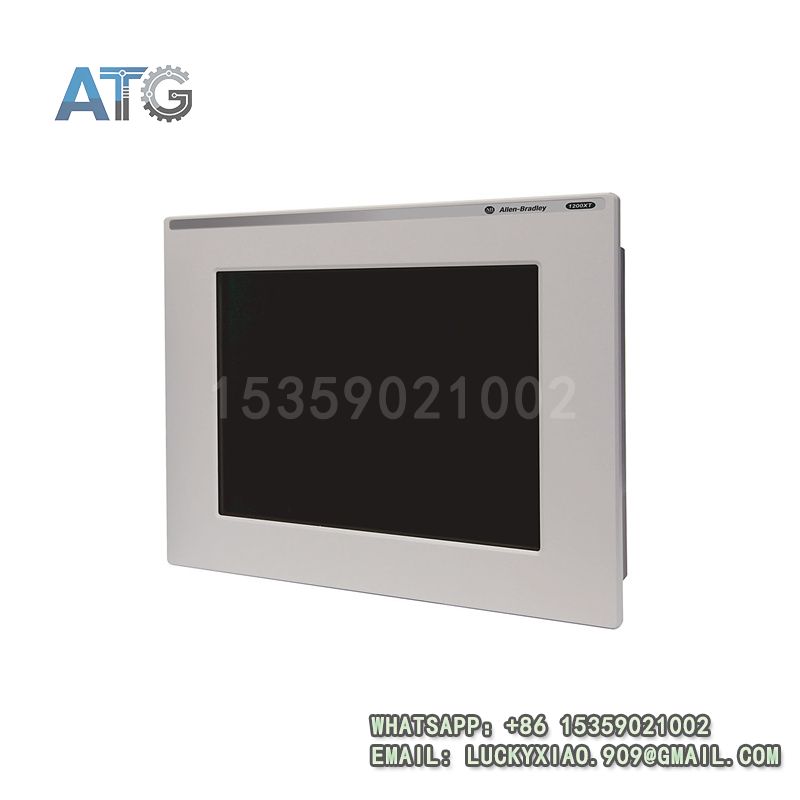
6181X-12TPXPDC
Product System Function Introduction
From a professional technical engineer’s perspective, the 6181X-12TPXPDC is a high-performance core human-machine interaction component for industrial automation systems, designed to meet the high-standard operation and monitoring needs of medium and large-scale projects. Its specific system functions are divided into the following points:
1. Functional Positioning and Core Value: As a key product of Allen-Bradley’s 6181X PanelView Plus 7 Series, it is positioned for medium and large-scale industrial automation projects that require high-definition display and complex operation. Its core value lies in providing a high-resolution touch operation interface, realizing comprehensive monitoring of multi-channel process parameters, accurate execution of complex control logic, and real-time management of equipment alarms, which is crucial for improving the intelligence and operational efficiency of the automation system.
2. Hardware Performance and Stability: The product is equipped with a 12-inch high-brightness color touchscreen with 1280×800 resolution, which can clearly display complex process flow diagrams, real-time trend curves of process parameters, and multi-channel data values. The touch operation is sensitive and accurate, with strong anti-interference ability, which can effectively reduce misoperation by on-site operators. In terms of structural design, it adopts a ruggedized enclosure with IP65 front panel protection rating, which can resist dust, water splashes and mechanical vibration in harsh industrial environments, ensuring long-term stable operation without frequent maintenance, which is in line with the long-term operation requirements of industrial on-site equipment.
3. Communication Compatibility and System Integration: It supports Ethernet communication protocol, which can realize seamless data interaction with Allen-Bradley mainstream controllers such as ControlLogix and CompactLogix. It can also be quickly integrated into industrial Ethernet networks, facilitating unified management and data sharing of the entire automation system. From the perspective of engineering application, its strong compatibility can reduce the difficulty of system integration, shorten the project debugging cycle, and improve the overall stability of the system.
4. Engineering Application Advantages: The 6181X-12TPXPDC supports configuration through Allen-Bradley FactoryTalk View Studio software, which can realize custom design of complex operation pages, historical data recording, alarm log query, and parameter setting functions. Engineers can design personalized operation interfaces according to actual process needs, which not only improves the operational convenience of on-site operators but also reduces the workload of equipment maintenance and management, effectively reducing the overall engineering cost.
Application Industries
Combined with practical engineering application experience, the 6181X-12TPXPDC is widely used in medium and large-scale industrial automation projects that require high-definition display, complex operation and stable performance, mainly covering the following fields:
1. Petrochemical Industry: It is applied in oil refining, chemical reaction kettle and other key process control systems, used to monitor temperature, pressure, flow and other key process parameters in real time, and realize complex process adjustment and alarm prompt, ensuring the safety and stability of the production process. Especially in flammable and explosive petrochemical scenarios, its stable performance and reliable protection level can effectively adapt to harsh on-site environments.
2. Automobile Manufacturing: Used in the whole vehicle assembly line control system, it can monitor the operation status of each station in real time, display equipment fault information and alarm prompts, facilitate maintenance personnel to quickly locate and handle faults, and improve the efficiency of the assembly line and the qualification rate of finished products.
3. Power Generation Industry: Applied in the auxiliary system control of thermal power plants and hydropower plants, it is used to monitor the operation status of pumps, fans, valves and other equipment, realize remote operation and parameter setting, and ensure the stable operation of the power generation system.
4. Metallurgical Industry: Used in smelting, rolling and other process control systems, it can display real-time data such as molten steel temperature, rolling speed and material thickness, assist operators in completing complex process adjustment, and ensure the stability and consistency of product quality.
Usage Instructions
From the perspective of professional technical operation and maintenance, the correct use of the 6181X-12TPXPDC is crucial to ensure its long-term stable operation. The specific usage instructions are divided into the following points:
1. Installation Requirements: Fix the panel to the equipment cabinet or mounting bracket with standard M5 screws, ensuring firm installation and tight fit between the front panel and the cabinet surface to maintain the IP65 protection performance. The installation position should avoid direct sunlight, high temperature (above 60℃) and strong vibration areas to prevent screen aging, display distortion or internal component damage. At the same time, the installation position should be convenient for operators to view and operate, avoiding excessive bending of the body during operation.
2. Wiring Specifications: The product adopts 24VDC standard power supply. When wiring, strictly distinguish the positive and negative poles, and never reverse the connection to avoid short circuit burning the internal power module. For communication wiring, use a standard Ethernet cable to connect to the communication port, ensure the wiring is firm and the contact is good, and the shielding layer of the Ethernet cable should be properly grounded to reduce electromagnetic interference in industrial environments. It is strictly prohibited to wire with power on to avoid electrical shock or component damage.
3. Parameter Configuration: Use Allen-Bradley FactoryTalk View Studio software to configure the HMI, including communication parameters (IP address, subnet mask, gateway), operation interface design (process flow diagram, parameter display, button function), process parameter monitoring points, alarm thresholds, historical data recording cycle and other settings. After the configuration is completed, download the project to the HMI through Ethernet, and restart the panel to make the configuration take effect. During the configuration process, it is necessary to ensure that the communication parameters match the connected controller to avoid communication failure.
4. Operation and Maintenance: During daily operation, regularly check the display clarity and touch sensitivity of the panel; if there is dust on the screen, clean it with a soft dry cloth to avoid scratching the display surface. Regularly back up the HMI configuration project to a computer or storage device to prevent configuration loss due to unexpected power failure or equipment failure. When a fault occurs (such as no display, communication interruption), first check the power supply voltage and wiring, then troubleshoot the communication link with the controller; if the internal components fail, contact professional maintenance personnel for inspection and replacement, and do not disassemble the panel without authorization.
5. Safety Precautions: Cut off the power supply before installation, disassembly or wiring to prevent electrical shock or internal component damage. Do not operate the panel with wet hands or sharp objects to avoid short circuit or screen damage. Avoid collision or impact on the panel to prevent physical damage to the enclosure and internal circuit board. In flammable and explosive industrial environments, strictly follow the on-site safety regulations and avoid using the product in violation of regulations to prevent safety accidents.